Open source · self-hostable
Swipe right.We apply.Internshipson autopilot
HireFlow finds internships, lets you keep or skip each one with a swipe, then tailors your resume, fills the application form and tracks the replies — only for the jobs you keep, and with you in control.
How it works
Find → Swipe → Apply
Three steps, and only one of them needs you: the swipe.
01
Find
The agent scans ATS job boards, curated internship lists and careers pages every few hours, removes duplicates and ranks every posting against your resume.
02
Swipe
Every job that passed your filters lands in a deck with its match score. Keep it or skip it in a second; nothing is skipped behind your back.
03
Apply & track
Kept jobs get a truthful tailored resume, a cover letter and a filled form. Replies and interviews are tracked from Gmail.
Watch
HireFlow in 60 seconds
From a fresh sign-up to the first deck, a kept job and a filled form.
One loop of the agent
01
02
03
04
05
Scan
Swipe
Tailor & fill
Apply
Track
Features
Everything after “I want this one”
Swipe Review
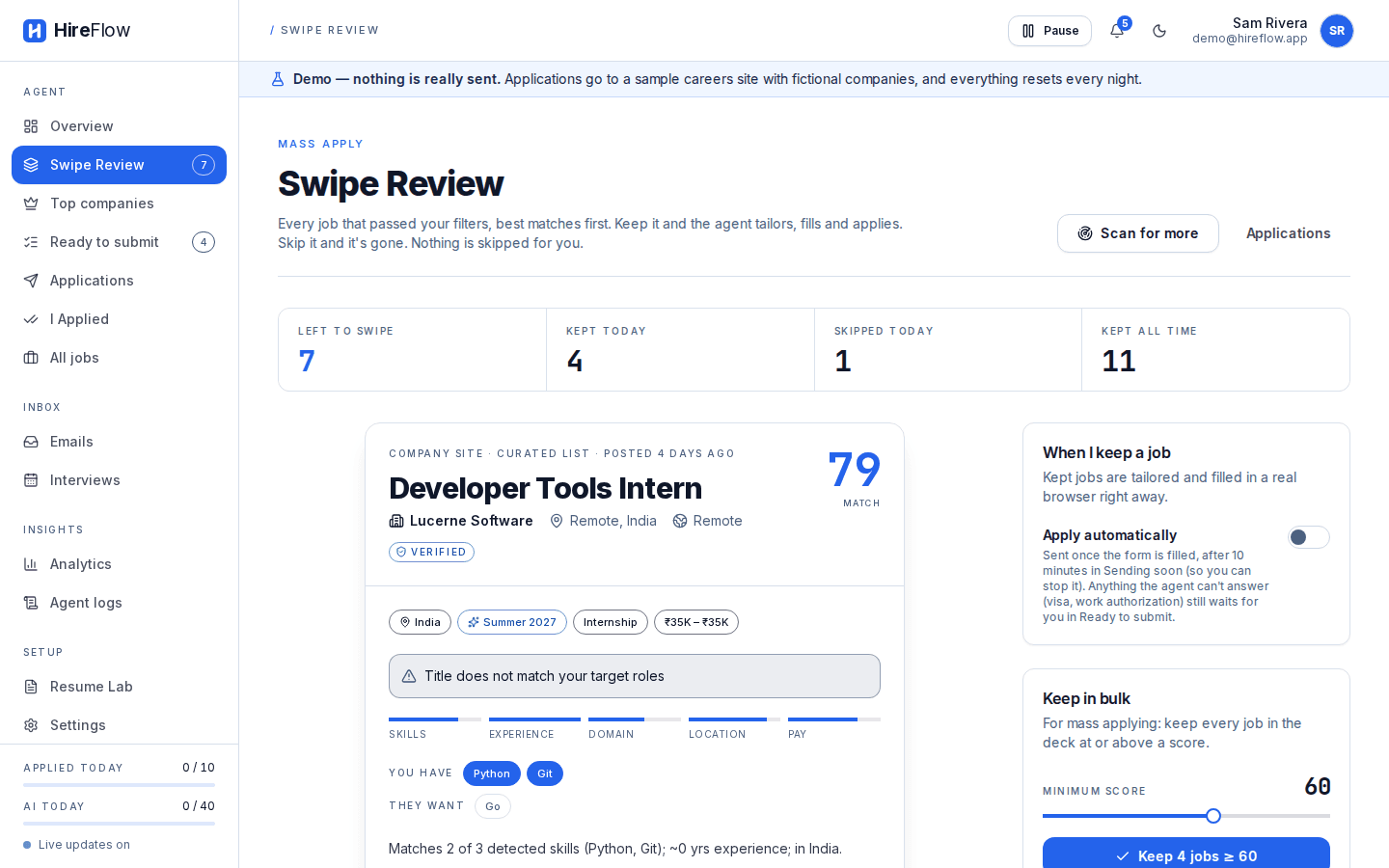
A deck of every matching internship, best first. Drag, tap or use ← → to keep or skip, undo any swipe, or keep everything above a score.
Resume tailoring
Each kept job gets a resume reordered for it and a cover letter, checked line by line against your original.
Form filling across ATSs
Greenhouse, Lever, Ashby, Workday and most careers pages, filled in a real browser with your saved answers.
Gmail tracking
Replies are read and sorted (acknowledged, interview, rejection, offer) and each application's status follows.
Interview prep
Invites go on your calendar with prep notes built from the job and your own projects.
Analytics
Your pipeline by status, daily activity, which platforms get responses and the keywords that get callbacks.
Swipe Review
Keep. Skip.
Repeat.
Drag right to keep and left to skip, swipe on your phone, or use the arrow keys. Each card shows why it matched, what you're missing and whether the company sponsors visas.
- Match score with the skills you have and the ones they want
- Location, term and visa sponsorship at a glance
- Undo any swipe until preparation starts
Safe by design
An agent with brakes
Applying for you is only useful if it never embarrasses you. These rules are enforced by the server, not just the UI. Responsible use
You pick every job
Only jobs you keep are prepared. New accounts start with “Submit automatically” off.
10-minute undo
Each application waits in “Sending soon”, so you can cancel it before it goes.
Caps and no duplicates
At most 25 a day and 3 per company a week, enforced by the server; never the same job twice.
Eligibility never guessed
Visa, work authorization and background questions wait for your own answer.
Never invents experience
Anything not on your resume (skills, titles, dates, numbers) is reverted.
Proof of what was sent
A screenshot before every submit, AI-written answers labelled and editable, and a dry-run mode.
Pause everything
One switch stops scans, preparation and sending at once.
Respects site rules
Sites that forbid automation stay off unless you opt in; rate limits and back-off everywhere.
Under the hood
How it's built
A FastAPI service and Celery workers share PostgreSQL and Redis. Slow work (scanning, AI calls, a browser filling a form) runs on queues, so the dashboard stays fast and a crashed task is retried.
- Next.js
- React
- TypeScript
- Tailwind CSS
- FastAPI
- SQLAlchemy
- PostgreSQL
- pgvector
- Redis
- Celery
- Playwright
- Docker
- GitHub Actions
You
- DashboardNext.js + React: onboarding, Swipe Review, tracking, analytics
- Browser extensionOptional: syncs your job-site sign-ins, only for sources you opt in to
HTTPS · same-origin /api proxy · httpOnly session cookie · live updates over WebSocket
API
- FastAPIAuth, the review deck, settings, guardrails, rate limits
- PostgreSQL + pgvectorJobs, applications, history, resume and job embeddings
- File storageResumes and form screenshots, on disk or S3 / R2
Tasks on Redis queues (a crashed task is retried; submissions are claimed atomically)
Workers
- Celery beatScans every few hours, the held-send sweep, nightly jobs
- Scan + prepareFetch, dedupe, match, then tailor and write answers
- Browser workerPlaywright fills each form, screenshots it, then submits
Outbound, rate-limited per site, with back-off
Outside
- ATS + careers pagesGreenhouse, Lever, Ashby, Workday and any careers page
- LLM providersAnthropic → OpenAI → local Ollama, whichever is set up
- Gmail + CalendarReplies update each application; interviews are scheduled
FAQ
Questions
Will it spam employers in my name?
No. Only jobs you keep are prepared, and each one waits 10 minutes in "Sending soon" so you can cancel it. The server caps applications at 25 a day and 3 per company a week, and never applies twice to the same job.
Does it make things up on my resume?
No. A tailored resume may only reorder and reword what is already on yours. A truthfulness check compares it with your original and reverts any skill, title, date or number that isn't there.
What about visa, work authorization and background questions?
They are never guessed and never sent to an AI model. The form waits for you until you answer once; your saved answers are reused after that.
Which sites does it apply on?
Greenhouse, Lever, Ashby and Workday forms, plus most careers pages. LinkedIn, Internshala, Indeed and Glassdoor forbid automation in their terms, so they stay off unless you turn them on and accept the risk.
Can I see what was sent?
Yes. Every application keeps a screenshot of the filled form, the resume and cover letter it used, and each AI-written answer, which you can edit before it goes out. Dry run fills forms without ever pressing Submit.
Can I sign in with Google?
Yes. “Continue with Google” signs you in, or creates your account the first time, once the computer running HireFlow has a free Google OAuth client set up (about five minutes, once). Email and password always work.
Which AI does it use, and what does it cost?
Anthropic, OpenAI or a free local model through Ollama, whichever you set up, with a fallback between them and a daily per-user cap. Without any model it still works on built-in heuristics.
Where does my data live?
On the server you run it on. You can download everything (JSON plus your files) or delete your account, which removes every row and file, from Settings.